> For the complete documentation index, see [llms.txt](https://spacecore.gitbook.io/wiki/llms.txt). Markdown versions of documentation pages are available by appending `.md` to page URLs; this page is available as [Markdown](https://spacecore.gitbook.io/wiki/en/network-and-security-configuration/resolv.conf-fix.md).
# \[DNS] Temporary failure resolving...
{% hint style="danger" %}
### This content is outdated
**The knowledge base has moved →** [**https://wiki.spacecore.pro/**](https://wiki.spacecore.pro/)
This wiki is no longer updated. All current guides and articles are at the new address.
{% endhint %}
{% content-ref url="" %}
{% endcontent-ref %}
***
In case you have problems with DNS servers.
The error looks like this:
We will show two ways to solve the problem, through SSH-access and through sFTP-access.
## Use SSH
Use the **Nano** utility to browse and edit the **resolv.conf** file where you configure our server’s **DNS**. Enter the command
```
nano /etc/resolv.conf
```
The file editor opened before us **resolv.conf**
{% hint style="info" %}
File will be empty, or it will contain text as a description, depending on the selected distribution **Linux**.
{% endhint %}
This file must specify **nameserver** for your **OS**.
{% hint style="info" %}
Which **nameserver** to choose? You can read more about this at the very end of the article. In this case, we will use **DNS 8.8.8.8** as the primary.
{% endhint %}
Enter this text in the file:
```
nameserver 8.8.8.8
nameserver 1.1.1.1
```
Press **Ctrl + X** to exit the file. Then press **Y** to save the changes.
Then press **Enter** to keep the file name as it is.
## Use sFTP
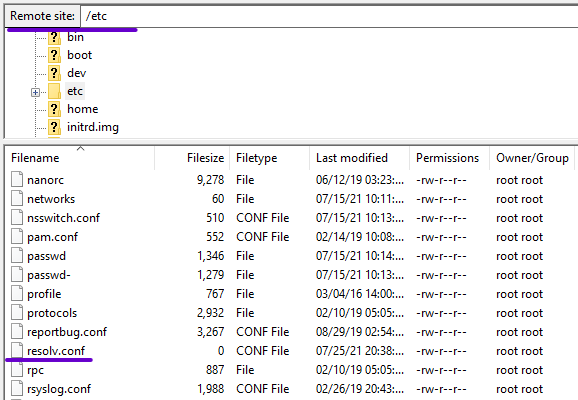
Connect to our server via **sFTP**. Next we need to go to the directory /**etc** and find there the file **resolv.conf**
Open it with any text editor.
{% hint style="info" %}
The file will be empty, or it will contain text as a description, depending on the **Linux** distribution you choose.
{% endhint %}
We need to add the optimal **nameserver** here, we will point them out several, in case of problems with one of them.
```
nameserver 8.8.8.8
nameserver 1.1.1.1
```
Great, save the file and upload it to the server.