> For the complete documentation index, see [llms.txt](https://spacecore.gitbook.io/wiki/llms.txt). Markdown versions of documentation pages are available by appending `.md` to page URLs; this page is available as [Markdown](https://spacecore.gitbook.io/wiki/en/network-and-security-configuration/iptables-configuration.md).
# Configure IPTables
{% hint style="danger" %}
### This content is outdated
**The knowledge base has moved →** [**https://wiki.spacecore.pro/**](https://wiki.spacecore.pro/)
This wiki is no longer updated. All current guides and articles are at the new address.
{% endhint %}
{% content-ref url="" %}
{% endcontent-ref %}
***
This is a subsystem for working with network packages, which passes through its filter all connections on the server. Let’s take a closer look at the IPTables configuration.
## General information
**IPTables** is already built into the main **Linux** kernel by default, but the tools for working with it in many distributions are not available by default, so let’s use the command to install the utility.
### Debian / Ubuntu
```
[sudo] apt install iptables
```
{% hint style="info" %}
**Sudo** is intended for use on the **Ubuntu** operating system. For **Debian**, a simple command is used.
{% endhint %}
### CentOS \[Fedora]
```
sudo yum install iptables
```
## Setting
After installing the utility, we will proceed to its detailed configuration.
## Arguments
{% hint style="info" %}
**-A** - add a rule to the section.
**-C** - check all the rules.
**-D** - Delete the rule.
**-I** - insert the rule with the required number.
**-L** - print all the rules in the current section.
**-S** - output all rules.
**-F** - clear all rules.
**-N** - Create a partition.
**-X** - Remove the partition.
**-P** - set the default action.
**-p** - install the protocol.
**-s** - specify the address of the sender.
**-d** - specify the recipient address.
**-i** is the input network interface.
**-o** is the outgoing network interface.
**-j** - follow the rule.
{% endhint %}
{% hint style="info" %}
**INPUT** —is responsible for handling incoming packets and connections.
**FORWARD** —is used for passing connections. This is where the corresponding packets come in, which are sent to your server, but do not define it as the purpose of delivery.
**OUTPUT** — completely opposite to the first. Used for outgoing packets and connections.
{% endhint %}
{% hint style="info" %}
**ACCEPT** — skip package.
**DROP** —remove package.
**REJECT** — reject the packet.
**LOG** — make a log file of the appropriate package.
**QUEUE** — send the packet to the user’s application.
{% endhint %}
## Opening port(s)
First, let’s check our list of rules:
```
iptables -L
```
Let’s try to open one**TCP-порт** **80** for **входящих соединений**:
```
iptables -t filter -A INPUT -p tcp --dport 80 -j ACCEPT
```
Let’s check the list again...
Now let’s try to open the **UDP** port range from **25565 to 25570** for outgoing connections:
```
iptables -t filter -A OUTPUT -p udp --dport 25565:25570 -j ACCEPT
```
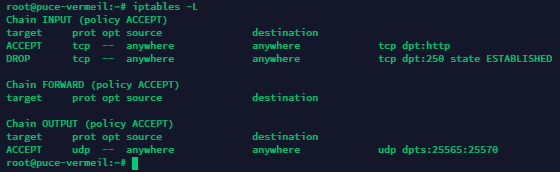
Let’s check the result.
Want to close **all inbound connections for TCP 250**? No problem.
```
iptables -t filter -A INPUT -p tcp --dport 250 -m state --state ESTABLISHED -j DROP
```
## Rule removal
Now try to remove the rule that allows inbound connections for **TCP 80**:
```
iptables -t filter -D INPUT -p tcp --dport 80 -j ACCEPT
```
## Deletion of all rules
To do this, use the command
```
iptables -F
```
## Preservation of established rules
By default, all the rules that have been created are applied until the next reboot and will be deleted during it. To avoid this, let’s save the **IPTables** rules that we created. To do this, use the appropriate command.
```
iptables-save
```
It worked. The rules are saved and will be active even after restarting our server!