# The Game Hosting panel

## Authorization and general

After activating your game hosting service, go to the link specified in the activation letter and enter data for authorization in the panel.

<figure><img src="https://287241268-files.gitbook.io/~/files/v0/b/gitbook-x-prod.appspot.com/o/spaces%2FyXvdNIxNLIOcexv7AfU2%2Fuploads%2FSKVkDGOXEsg8NIxs9Qwb%2Fimage.png?alt=media&#x26;token=79f2ee4d-16cf-4285-a8ee-f8a51bf65c43" alt=""><figcaption></figcaption></figure>

Great. You have successfully logged in to the control panel.

<figure><img src="https://287241268-files.gitbook.io/~/files/v0/b/gitbook-x-prod.appspot.com/o/spaces%2FyXvdNIxNLIOcexv7AfU2%2Fuploads%2FPtN8nUEslSyWAzbcqCKP%2Fimage.png?alt=media&#x26;token=4b3f2b62-e095-453e-835c-7e5ba80d578e" alt=""><figcaption></figcaption></figure>

Some buttons are displayed at the top right. The first one allows you to search among your active servers.

<figure><img src="https://287241268-files.gitbook.io/~/files/v0/b/gitbook-x-prod.appspot.com/o/spaces%2FyXvdNIxNLIOcexv7AfU2%2Fuploads%2FMo1CanaWT1JQV6s7rhad%2Fimage.png?alt=media&#x26;token=5da22ef7-6698-4af7-b439-cf403eba8343" alt=""><figcaption></figcaption></figure>

The second tab accordingly moves you to the list of all servers page.

In the third one, you can interact with your profile settings, namely, change the **password, E-mail** **address** and enable **2FA authentication**. The **API** configuration is also available.

<figure><img src="https://287241268-files.gitbook.io/~/files/v0/b/gitbook-x-prod.appspot.com/o/spaces%2FyXvdNIxNLIOcexv7AfU2%2Fuploads%2F79s9TS47zaZjxLUH60Jv%2Fimage.png?alt=media&#x26;token=f9900807-31de-4b88-920f-c6b7e0e99e20" alt=""><figcaption></figcaption></figure>

The last button allows you to log out of an authorized account.

## Server Pages

### Console <a href="#console" id="console"></a>

When you go to the page of any of the servers, you see something like this interface. It is the same for all games, only the server output in the console differs.

<figure><img src="https://287241268-files.gitbook.io/~/files/v0/b/gitbook-x-prod.appspot.com/o/spaces%2FyXvdNIxNLIOcexv7AfU2%2Fuploads%2FUqhd4cMB6ZdM3RCXTvmw%2Fimage.png?alt=media&#x26;token=8ddeb8c8-38dd-44ac-b3ea-aff7c68394ae" alt=""><figcaption></figcaption></figure>

On this page, you can view the general statistics of the server load, namely the load of the **CPU, RAM** and **drive**. You can also use the buttons to start, restart, and stop the game server. The console for entering commands to the game server is presented as the largest window.

### File Manager

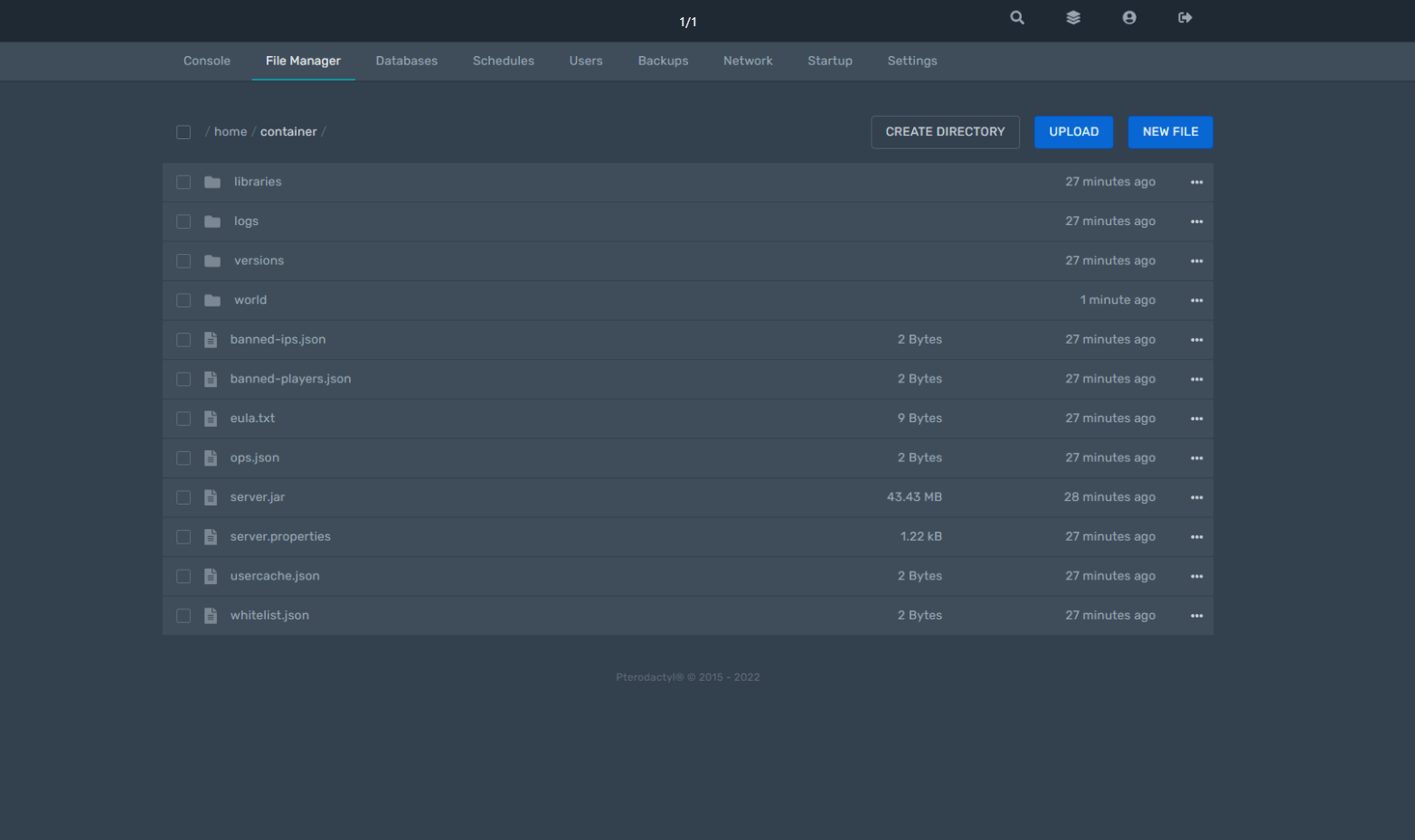
Here you can manage your server's files. Editing of text documents is available. Using the buttons above the file list, you can create directories, upload files, and create them directly on a remote server.

<figure><img src="https://287241268-files.gitbook.io/~/files/v0/b/gitbook-x-prod.appspot.com/o/spaces%2FyXvdNIxNLIOcexv7AfU2%2Fuploads%2FuSoHiRHPFD5fi6toUoSh%2Fimage.png?alt=media&#x26;token=4ca9dde4-b744-44d8-a4c4-8e84c072a638" alt=""><figcaption></figcaption></figure>

You can upload any file to the game server by simply "throwing" it into the browser.

<figure><img src="https://287241268-files.gitbook.io/~/files/v0/b/gitbook-x-prod.appspot.com/o/spaces%2FyXvdNIxNLIOcexv7AfU2%2Fuploads%2FnbhquuvpE6nDbgZ8mfSq%2Fimage.png?alt=media&#x26;token=10b7ab84-f9e7-4b3c-9081-3256bbada328" alt=""><figcaption></figcaption></figure>

### Databases

In this section, you can create databases and interact with them for the correct operation of some plugins, as well as reliable sorting of game server data.

<figure><img src="https://287241268-files.gitbook.io/~/files/v0/b/gitbook-x-prod.appspot.com/o/spaces%2FyXvdNIxNLIOcexv7AfU2%2Fuploads%2FhfDODh6dvKSf1y1vaxev%2Fimage.png?alt=media&#x26;token=51de9f24-4c96-4617-82f9-dac2b39e048c" alt=""><figcaption></figcaption></figure>

### Schedules

<figure><img src="https://287241268-files.gitbook.io/~/files/v0/b/gitbook-x-prod.appspot.com/o/spaces%2FyXvdNIxNLIOcexv7AfU2%2Fuploads%2F0JyvAs7Upbi80k8mAQQU%2Fimage.png?alt=media&#x26;token=0a67ec92-8963-4d6a-a0d6-822dbf5891bd" alt=""><figcaption></figcaption></figure>

### Users

Here you can add an additional user who will have specific access to your server. This can be useful when you are going to work in the game panel with a team.

<figure><img src="https://287241268-files.gitbook.io/~/files/v0/b/gitbook-x-prod.appspot.com/o/spaces%2FyXvdNIxNLIOcexv7AfU2%2Fuploads%2FnGv0g3TgUIA5EAMdZHhE%2Fimage.png?alt=media&#x26;token=f870e6e7-ede3-49c5-9b23-295de2802a7c" alt=""><figcaption></figcaption></figure>

### Backups

The ability to manually create backups, if such an option is provided in your tariff plan.

<figure><img src="https://287241268-files.gitbook.io/~/files/v0/b/gitbook-x-prod.appspot.com/o/spaces%2FyXvdNIxNLIOcexv7AfU2%2Fuploads%2F94KsDxIHcwOYARK6E66M%2Fimage.png?alt=media&#x26;token=dfcbe848-781b-409e-8e1c-73c515f24d48" alt=""><figcaption></figcaption></figure>

### Network

Here you can make basic network settings for your game server. For example, to allocate additional ports if necessary.

<figure><img src="https://287241268-files.gitbook.io/~/files/v0/b/gitbook-x-prod.appspot.com/o/spaces%2FyXvdNIxNLIOcexv7AfU2%2Fuploads%2FeQ0ryl4zqEN4jXPIUEb7%2Fimage.png?alt=media&#x26;token=86d769c8-2e56-4dea-bd5c-e61f8ad545da" alt=""><figcaption></figcaption></figure>

### Startup

In this subcategory, the startup parameters of your game server are configured.

{% hint style="warning" %}
Note that the available options will vary depending on the game you selected for your server. An example for **Minecraft Vanilla** is presented in the screenshot below.
{% endhint %}

<figure><img src="https://287241268-files.gitbook.io/~/files/v0/b/gitbook-x-prod.appspot.com/o/spaces%2FyXvdNIxNLIOcexv7AfU2%2Fuploads%2FqAPzrdYWxr5biEwx20nV%2Fimage.png?alt=media&#x26;token=2fe2973c-fcfb-4c7b-a670-9518fdbb5d23" alt=""><figcaption></figcaption></figure>

### Settings

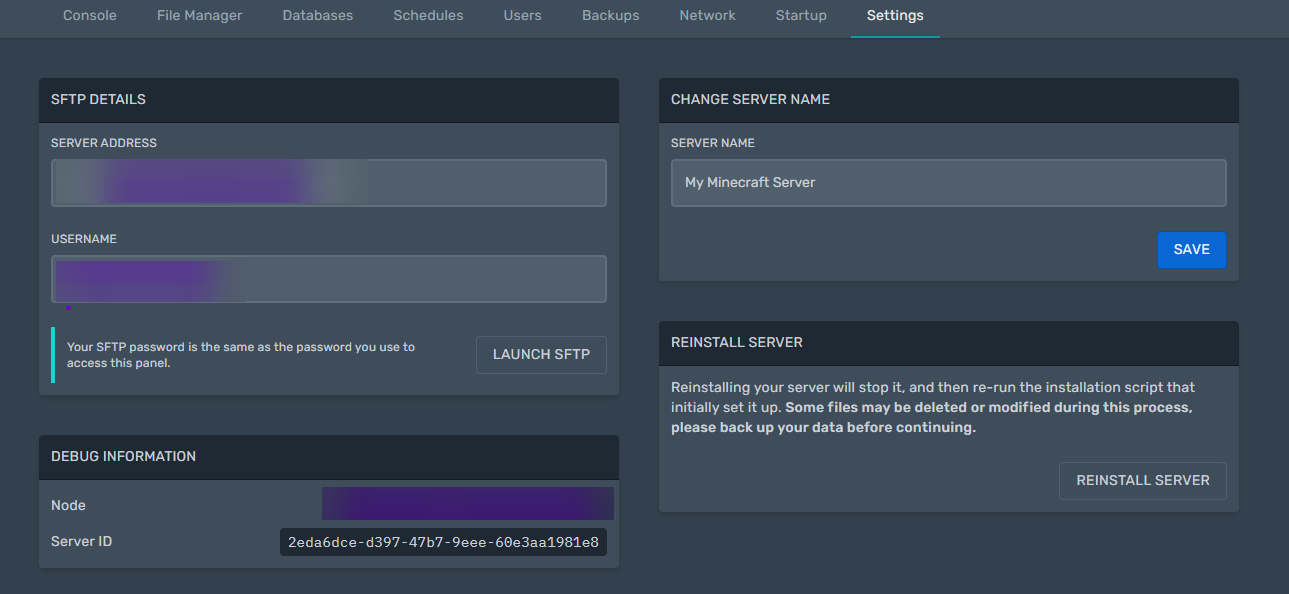
The **Settings** section provides information to access your game server’s **sFTP**. You can also change the visual name of your server in the game panel. In the bottom right corner, a button is available to fully reinstall the selected game server.

<figure><img src="https://287241268-files.gitbook.io/~/files/v0/b/gitbook-x-prod.appspot.com/o/spaces%2FyXvdNIxNLIOcexv7AfU2%2Fuploads%2FM9YOc5JigLKht5jfGl5Z%2Fimage.png?alt=media&#x26;token=83b65294-f8bc-4102-b19e-cf39f8aba3fb" alt=""><figcaption></figcaption></figure>